728x90
import cv2
import mediapipe as mp
import numpy as np
import pygame
from pygame.locals import *
from OpenGL.GL import *
from OpenGL.GLU import *
import math
import random
# MediaPipe 손 검출 초기화
mp_hands = mp.solutions.hands
hands = mp_hands.Hands(static_image_mode=False, max_num_hands=1, min_detection_confidence=0.5)
# OpenGL 텍스처 ID 저장
texture_id = None
# 3D 큐브 데이터
vertices = [
[-0.5, -0.5, -0.5], [0.5, -0.5, -0.5], [0.5, 0.5, -0.5], [-0.5, 0.5, -0.5],
[-0.5, -0.5, 0.5], [0.5, -0.5, 0.5], [0.5, 0.5, 0.5], [-0.5, 0.5, 0.5]
]
faces = [
(0, 1, 2, 3), (4, 5, 6, 7),
(0, 1, 5, 4), (2, 3, 7, 6),
(0, 3, 7, 4), (1, 2, 6, 5)
]
colors = [(1, 0, 0), (0, 1, 0), (0, 0, 1), (1, 1, 0), (1, 0, 1), (0, 1, 1)]
def lerp(a, b, t):
"""선형 보간 함수 (부드러운 크기 변화)"""
return a + (b - a) * t
def init_texture(width, height):
"""OpenGL 텍스처 초기화 (웹캠 배경)"""
global texture_id
texture_id = glGenTextures(1)
glBindTexture(GL_TEXTURE_2D, texture_id)
glTexParameteri(GL_TEXTURE_2D, GL_TEXTURE_MIN_FILTER, GL_LINEAR)
glTexParameteri(GL_TEXTURE_2D, GL_TEXTURE_MAG_FILTER, GL_LINEAR)
glTexImage2D(GL_TEXTURE_2D, 0, GL_RGB, width, height, 0, GL_RGB, GL_UNSIGNED_BYTE, None)
def update_texture(frame):
"""웹캠 프레임을 OpenGL 텍스처로 업데이트"""
if frame is None or frame.shape[0] == 0 or frame.shape[1] == 0:
return # 프레임이 비어있으면 업데이트 안함
glBindTexture(GL_TEXTURE_2D, texture_id)
frame = cv2.flip(frame, 0) # OpenGL 좌표계에 맞추기 위해 상하 반전
frame = cv2.cvtColor(frame, cv2.COLOR_BGR2RGB) # BGR → RGB 변환
frame = cv2.resize(frame, (640, 480)) # OpenGL과 맞추기 위해 크기 조정
glTexSubImage2D(GL_TEXTURE_2D, 0, 0, 0, 640, 480, GL_RGB, GL_UNSIGNED_BYTE, frame)
def detect_hand(frame):
"""손 검출 및 손가락 간 거리 계산"""
if frame is None:
return None # 프레임이 없을 경우
frame_rgb = cv2.cvtColor(frame, cv2.COLOR_BGR2RGB)
results = hands.process(frame_rgb)
if results.multi_hand_landmarks:
for hand_landmarks in results.multi_hand_landmarks:
# 손바닥 중심점
x = int(hand_landmarks.landmark[9].x * frame.shape[1])
y = int(hand_landmarks.landmark[9].y * frame.shape[0])
# 손가락 간 거리 계산 (손을 쥐었는지 여부)
distances = [abs(hand_landmarks.landmark[i].y - hand_landmarks.landmark[9].y) for i in [8, 12, 16, 20]]
avg_distance = sum(distances) / len(distances)
# 주먹 감지 (손가락이 손바닥에 가까운 경우)
is_fist = avg_distance < 0.07
return x, y, avg_distance, is_fist
return None
def draw_background():
"""웹캠 영상을 OpenGL 배경으로 렌더링"""
glEnable(GL_TEXTURE_2D)
glBindTexture(GL_TEXTURE_2D, texture_id)
glBegin(GL_QUADS)
glTexCoord2f(0, 0); glVertex3f(-3, -2, -5)
glTexCoord2f(1, 0); glVertex3f(3, -2, -5)
glTexCoord2f(1, 1); glVertex3f(3, 2, -5)
glTexCoord2f(0, 1); glVertex3f(-3, 2, -5)
glEnd()
glDisable(GL_TEXTURE_2D)
# 랜덤한 내부 돌덩이 형태 생성
def generate_inner_shape():
"""큐브 내부의 울퉁불퉁한 도형을 위한 랜덤한 정점 생성"""
return [[random.uniform(-0.3, 0.3) for _ in range(3)] for _ in range(12)] # 12개의 랜덤 점 생성
# 내부 도형 정점 데이터 생성
inner_shape_vertices = generate_inner_shape()
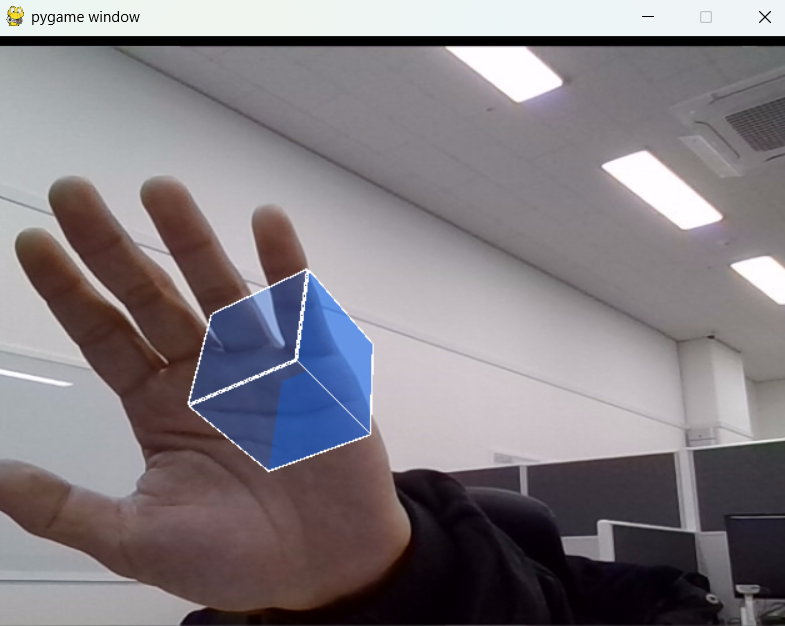
def draw_cube(scale_factor, x_offset, y_offset, angle_x, angle_y):
"""모서리 색상 변경 + 반투명 큐브 + 내부 복잡한 도형 추가"""
# 서서히 밝아졌다 어두워지는 네온 효과 (sin 기반)
time_factor = pygame.time.get_ticks() / 1000.0
glow_intensity = 0.3 + 0.7 * (math.sin(time_factor * 2) ** 2)
glPushMatrix()
glTranslatef(x_offset, y_offset, -3.0)
glScalef(scale_factor, scale_factor, scale_factor)
glRotatef(angle_x, 1, 0, 0)
glRotatef(angle_y, 0, 1, 0)
# 기존 재질 속성 저장 (배경 영향 없음)
glPushAttrib(GL_LIGHTING_BIT | GL_CURRENT_BIT)
# 내부 발광 설정 (네온 효과)
glow_color = [0.0, glow_intensity, 1.5 * glow_intensity, 1.0]
glMaterialfv(GL_FRONT_AND_BACK, GL_EMISSION, glow_color)
glEnable(GL_BLEND)
glBlendFunc(GL_SRC_ALPHA, GL_ONE_MINUS_SRC_ALPHA)
# 큐브 면 그리기 (반투명 + 네온 블루 효과)
glBegin(GL_QUADS)
for face in faces:
glColor4f(0.0, glow_intensity, 1.0, 0.3) # 투명한 네온 블루 색상 적용
for vertex in face:
glVertex3fv(vertices[vertex])
glEnd()
# 큐브 모서리 강조 (선 색상 변경)
glLineWidth(2.5)
glColor3f(1.0, 1.0, 1.0) # 흰색 테두리 적용
glBegin(GL_LINES)
for face in faces:
for i in range(4):
glVertex3fv(vertices[face[i]])
glVertex3fv(vertices[face[(i + 1) % 4]])
glEnd()
# 내부 복잡한 도형 그리기 (울퉁불퉁한 돌덩이 느낌)
glBegin(GL_TRIANGLES)
for i in range(len(inner_shape_vertices)):
glColor4f(0.0, 1.5 * glow_intensity, 1.0, 0.5) # 내부 도형은 더 밝은 색상 적용
glVertex3fv(inner_shape_vertices[i])
glEnd()
# 원래 재질 속성 복원 (배경 영향 없음)
glPopAttrib()
glDisable(GL_BLEND)
glPopMatrix()
def main():
cap = cv2.VideoCapture(0)
if not cap.isOpened():
print("🚨 웹캠을 열 수 없습니다!")
return
pygame.init()
display = (640, 480)
pygame.display.set_mode(display, DOUBLEBUF | OPENGL)
glEnable(GL_DEPTH_TEST)
glMatrixMode(GL_PROJECTION)
glLoadIdentity()
gluPerspective(45, (640 / 480), 0.1, 50.0)
glMatrixMode(GL_MODELVIEW)
init_texture(640, 480)
scale_factor = 0.3
x_offset, y_offset = 0.0, 0.0
angle_x, angle_y = 0, 0
running = True
while running:
ret, frame = cap.read()
if not ret or frame is None:
pygame.time.wait(50) # 손이 감지되지 않을 때 부하 감소
continue # 프레임이 없으면 루프 유지
update_texture(frame)
hand = detect_hand(frame)
if hand:
center_x, center_y, avg_distance, is_fist = hand
x_offset = (center_x - 640 / 2) / (640 / 2)
y_offset = -(center_y - 480 / 2) / (480 / 2)
target_scale = 0.1 if is_fist else max(0.2, min(0.5, avg_distance * 8))
scale_factor = lerp(scale_factor, target_scale, 0.2)
else:
pygame.time.wait(50) # 손이 없으면 루프 속도 낮춤
angle_x += y_offset * 30
angle_y += x_offset * 30
glClear(GL_COLOR_BUFFER_BIT | GL_DEPTH_BUFFER_BIT)
glLoadIdentity()
draw_background()
draw_cube(scale_factor, x_offset, y_offset, angle_x, angle_y)
pygame.display.flip()
for event in pygame.event.get():
if event.type == pygame.QUIT or (event.type == pygame.KEYDOWN and event.key == pygame.K_ESCAPE):
running = False
cap.release()
pygame.quit()
if __name__ == "__main__":
main()
📌 필수 패키지 목록
패키지역할설치 명령
| opencv-python | OpenCV: 카메라 영상 처리 및 실시간 스트리밍 | pip install opencv-python |
| mediapipe | MediaPipe: 손 추적 및 랜드마크 감지 | pip install mediapipe |
| pygame | Pygame: OpenGL과 함께 창 생성 및 이벤트 핸들링 | pip install pygame |
| PyOpenGL | OpenGL을 통한 3D 그래픽 렌더링 | pip install PyOpenGL |
| PyOpenGL_accelerate | OpenGL 속도 가속화 (성능 향상) | pip install PyOpenGL_accelerate |
| numpy | 벡터 연산 및 좌표 데이터 처리 | pip install numpy |
| math | 기본 수학 연산 (Python 내장) | 설치 불필요 |
| random | 랜덤 값 생성 (Python 내장) | 설치 불필요 |
728x90


