728x90
import cv2
import numpy as np
import traceback
from abc import ABC, abstractmethod
# ---------------------------
# 추상 클래스: 객체 검출
# ---------------------------
# **디자인 패턴**: 템플릿 메서드 패턴
# ObjectDetector는 객체 검출 알고리즘의 공통 인터페이스를 정의하며,
# 세부 구현은 하위 클래스에서 수행하도록 설계되었습니다.
class ObjectDetector(ABC):
@abstractmethod
def detect_objects(self, frame):
pass
# ---------------------------
# YOLO 기반 객체 검출 구현
# ---------------------------
# **디자인 패턴**: 팩토리 메서드 패턴
# YOLOProcessor는 YOLO 모델을 초기화하고 객체 검출을 수행하는 구현체입니다.
# _initialize_yolo 메서드를 통해 YOLO 네트워크 초기화 과정을 캡슐화합니다.
class YOLOProcessor(ObjectDetector):
def __init__(self, config_path, weights_path, classes_path, score_threshold=0.5, nms_threshold=0.4):
self.net, self.classes = self._initialize_yolo(config_path, weights_path, classes_path)
self.score_threshold = score_threshold
self.nms_threshold = nms_threshold
def _initialize_yolo(self, config_path, weights_path, classes_path):
# **디자인 패턴**: 팩토리 메서드 패턴
# YOLO 모델과 클래스 파일을 초기화하여 캡슐화.
with open(classes_path, 'r') as f:
classes = [line.strip() for line in f.readlines()]
net = cv2.dnn.readNet(weights_path, config_path)
net.setPreferableBackend(cv2.dnn.DNN_BACKEND_OPENCV)
net.setPreferableTarget(cv2.dnn.DNN_TARGET_CPU)
return net, classes
def detect_objects(self, frame):
# **디자인 패턴**: 템플릿 메서드 패턴
# 객체 검출의 기본 로직을 구현하며, YOLO를 사용한 세부 로직은 이 메서드에 구현.
try:
blob = cv2.dnn.blobFromImage(frame, 1 / 255.0, (416, 416), swapRB=True, crop=False)
self.net.setInput(blob)
layer_outputs = self.net.forward(self.net.getUnconnectedOutLayersNames())
boxes, confidences = [], []
for output in layer_outputs:
for detection in output:
scores = detection[5:]
class_id = np.argmax(scores)
confidence = scores[class_id]
if self.classes[class_id] == "person" and confidence > self.score_threshold:
center_x = int(detection[0] * frame.shape[1])
center_y = int(detection[1] * frame.shape[0])
w = int(detection[2] * frame.shape[1])
h = int(detection[3] * frame.shape[0])
x = int(center_x - w / 2)
y = int(center_y - h / 2)
boxes.append([x, y, w, h])
confidences.append(float(confidence))
indices = cv2.dnn.NMSBoxes(boxes, confidences, self.score_threshold, self.nms_threshold)
# 디버깅 출력: 객체 검출 결과 확인
print(f"boxes: {boxes}")
print(f"confidences: {confidences}")
print(f"indices: {indices}")
final_boxes = []
if indices is not None:
if isinstance(indices, (list, np.ndarray)):
final_boxes = [boxes[i] for i in indices.flatten()]
elif isinstance(indices, int):
final_boxes = [boxes[indices]]
return final_boxes
except Exception as e:
print("Error during object detection:")
traceback.print_exc()
return []
# ---------------------------
# 추상 클래스: 옵티컬 플로우
# ---------------------------
# **디자인 패턴**: 템플릿 메서드 패턴
# FlowProcessor는 옵티컬 플로우 알고리즘의 공통 인터페이스를 정의하며,
# 구체적인 플로우 계산은 하위 클래스에서 구현됩니다.
class FlowProcessor(ABC):
@abstractmethod
def calculate_flow(self, prev_gray, gray, box):
pass
# ---------------------------
# 옵티컬 플로우 계산 구현
# ---------------------------
# **디자인 패턴**: 템플릿 메서드 패턴
# OpticalFlowProcessor는 Farneback 알고리즘을 사용해 구체적인 플로우 계산을 수행합니다.
class OpticalFlowProcessor(FlowProcessor):
def __init__(self, frame_rate):
self.frame_rate = frame_rate
def calculate_flow(self, prev_gray, gray, box):
try:
x, y, w, h = box
roi_prev_gray = prev_gray[y:y+h, x:x+w]
roi_gray = gray[y:y+h, x:x+w]
if roi_prev_gray.size == 0 or roi_gray.size == 0:
raise ValueError("Empty region of interest (ROI) for optical flow calculation.")
flow = cv2.calcOpticalFlowFarneback(roi_prev_gray, roi_gray, None, 0.5, 3, 15, 3, 5, 1.2, 0)
valid_magnitude = np.sqrt(flow[..., 0]**2 + flow[..., 1]**2)
threshold = np.percentile(valid_magnitude, 80)
valid_mask = valid_magnitude > threshold
if not valid_mask.any():
raise ValueError("No valid flow vectors found.")
avg_fx = np.mean(flow[..., 0][valid_mask])
avg_fy = np.mean(flow[..., 1][valid_mask])
avg_speed = np.mean(valid_magnitude[valid_mask]) * self.frame_rate if valid_mask.any() else 0
# 디버깅 출력: 플로우 벡터 결과 확인
print(f"Flow vectors: avg_fx={avg_fx}, avg_fy={avg_fy}, avg_speed={avg_speed}")
return avg_fx, avg_fy, avg_speed
except Exception as e:
print("Error during optical flow calculation:")
traceback.print_exc()
return None, None, None
# ---------------------------
# 비즈니스 로직: 동영상 처리
# ---------------------------
# **디자인 패턴**: 전략 패턴
# VideoProcessor는 객체 검출기와 플로우 계산기를 동적으로 교체할 수 있도록 설계되었습니다.
# 이를 통해 YOLO 외에도 SSD, Faster R-CNN 등을 사용할 수 있습니다.
class VideoProcessor:
def __init__(self, video_path, detector: ObjectDetector, flow_processor: FlowProcessor, frame_width=640, frame_height=360):
self.video_path = video_path
self.detector = detector # **디자인 패턴**: 의존성 주입
self.flow_processor = flow_processor # **디자인 패턴**: 의존성 주입
self.frame_width = frame_width
self.frame_height = frame_height
self.direction_buffer = {} # **디자인 원칙**: 단일 책임 원칙 (SRP)
def process(self):
cap = cv2.VideoCapture(self.video_path)
ret, prev_frame = cap.read()
if not ret:
print("Error: Unable to open video file.")
cap.release()
return
prev_frame = cv2.resize(prev_frame, (self.frame_width, self.frame_height))
prev_gray = cv2.cvtColor(prev_frame, cv2.COLOR_BGR2GRAY)
frame_rate = cap.get(cv2.CAP_PROP_FPS)
while True:
try:
ret, frame = cap.read()
if not ret:
print("End of video file reached. Restarting...")
cap.set(cv2.CAP_PROP_POS_FRAMES, 0)
continue
frame = cv2.resize(frame, (self.frame_width, self.frame_height))
gray = cv2.cvtColor(frame, cv2.COLOR_BGR2GRAY)
# 객체 검출 실행
final_boxes = self.detector.detect_objects(frame)
print(f"Final boxes detected: {final_boxes}")
for i, box in enumerate(final_boxes):
avg_fx, avg_fy, avg_speed = self.flow_processor.calculate_flow(prev_gray, gray, box)
if avg_fx is None or avg_fy is None:
continue
if avg_fx > 0:
avg_fx = -np.abs(avg_fx)
if np.abs(avg_fy) > 0.2:
avg_fy = 0
if i not in self.direction_buffer:
self.direction_buffer[i] = (avg_fx, avg_fy)
else:
prev_fx, prev_fy = self.direction_buffer[i]
avg_fx = 0.8 * prev_fx + 0.2 * avg_fx
avg_fy = 0.8 * prev_fy + 0.2 * avg_fy
self.direction_buffer[i] = (avg_fx, avg_fy)
self._draw_arrow_and_text(frame, box, avg_fx, avg_fy, avg_speed)
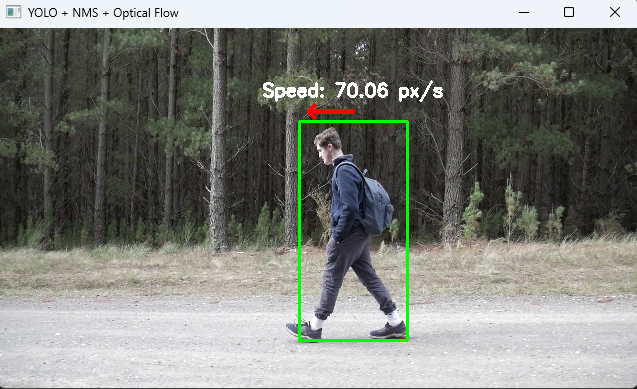
cv2.imshow('YOLO + NMS + Optical Flow', frame)
prev_gray = gray
if cv2.waitKey(1) & 0xFF == ord('q'):
break
except Exception as e:
print("Error during frame processing:")
traceback.print_exc()
break
cap.release()
cv2.destroyAllWindows()
def _draw_arrow_and_text(self, frame, box, avg_fx, avg_fy, avg_speed, arrow_width=5, x_scale_factor=0.5):
try:
x, y, w, h = box
text = f"Speed: {avg_speed:.2f} px/s"
text_size = cv2.getTextSize(text, cv2.FONT_HERSHEY_SIMPLEX, 0.6, 2)[0]
vector_length = text_size[0]
# Normalize the direction vector
magnitude = np.sqrt(avg_fx**2 + avg_fy**2) + 1e-6
direction_x = (avg_fx / magnitude) * vector_length * x_scale_factor
direction_y = (avg_fy / magnitude) * vector_length
# Calculate arrow start and end points
arrow_start = (x + w // 2, y - 10)
arrow_end = (x + w // 2 + int(direction_x), arrow_start[1] - int(direction_y))
text_position = (arrow_start[0] - text_size[0] // 2, arrow_start[1] - 15)
# Draw arrow
cv2.arrowedLine(frame, arrow_start, arrow_end, (0, 0, 255), arrow_width, tipLength=0.4)
# Draw text
cv2.putText(frame, text, text_position, cv2.FONT_HERSHEY_SIMPLEX, 0.6, (255, 255, 255), 2)
# Draw bounding box
cv2.rectangle(frame, (x, y), (x + w, y + h), (0, 255, 0), 2)
except Exception as e:
print("Error during arrow and text drawing:")
traceback.print_exc()
# ---------------------------
# 실행 코드
# ---------------------------
if __name__ == "__main__":
# **디자인 패턴**: 전략 패턴
# 다양한 객체 검출기와 플로우 계산기를 동적으로 교체 가능.
yolo_config = 'D:\\yolov4-tiny.cfg'
yolo_weights = 'D:\\yolov4-tiny.weights'
yolo_classes = 'D:\\coco.names'
video_path = 'D:\\video.mp4'
yolo_processor = YOLOProcessor(yolo_config, yolo_weights, yolo_classes)
flow_processor = OpticalFlowProcessor(frame_rate=30)
video_processor = VideoProcessor(video_path, yolo_processor, flow_processor)
video_processor.process()
728x90
'PY(Python Image Processing)' 카테고리의 다른 글
| AR 기능 구현 - python opencv pygame opengl (0) | 2025.02.25 |
|---|---|
| optical flow - python, opencv 추상화 및 디자인패턴 적용 - 화살표 방향 수정 (0) | 2025.02.25 |
| optical flow - python, opencv, 추상화 클래스 추가 구현 (0) | 2024.12.24 |
| optical flow - opencv & python (0) | 2024.12.24 |
| python pip install (2) | 2024.09.02 |


