728x90
"""
#디렉토리구조
my_character_recognition/
├── dataset/
│ ├── A/
│ │ ├── image1.png
│ │ ├── image2.png
│ │ └── ...
│ ├── B/
│ │ ├── image3.png
│ │ ├── image4.png
│ │ └── ...
│ └── ... # 클래스별 폴더
├── labels.pkl
├── character_recognition_model.h5 #학습 후 자동생성
├── ui_app.py
└── requirements.txt
"""
"""
#requirements.txt
tensorflow
opencv-python
numpy
"""
"""
#operation
pip install -r requirements.txt
python ui_app.py
"""
import os
import cv2
import numpy as np
import tensorflow as tf
from tkinter import Tk, Label, Button, filedialog, simpledialog
from PIL import Image, ImageTk
import shutil
import pickle
# 설정
img_height = 150
img_width = 150
dataset_dir = 'dataset/'
label_file = 'labels.pkl'
model_file = 'character_recognition_model.h5'
class_names = list("ABCDEFGHIJKLMNOPQRSTUVWXYZ")
# 라벨 파일 불러오기 또는 초기화
if os.path.exists(label_file):
with open(label_file, 'rb') as f:
image_labels = pickle.load(f)
else:
image_labels = {}
class CharacterRecognitionApp:
def __init__(self, master):
self.master = master
master.title("Character Recognition")
master.geometry("680x880")
master.resizable(False, False)
# UI 구성 (글씨 크기 및 패딩 조정)
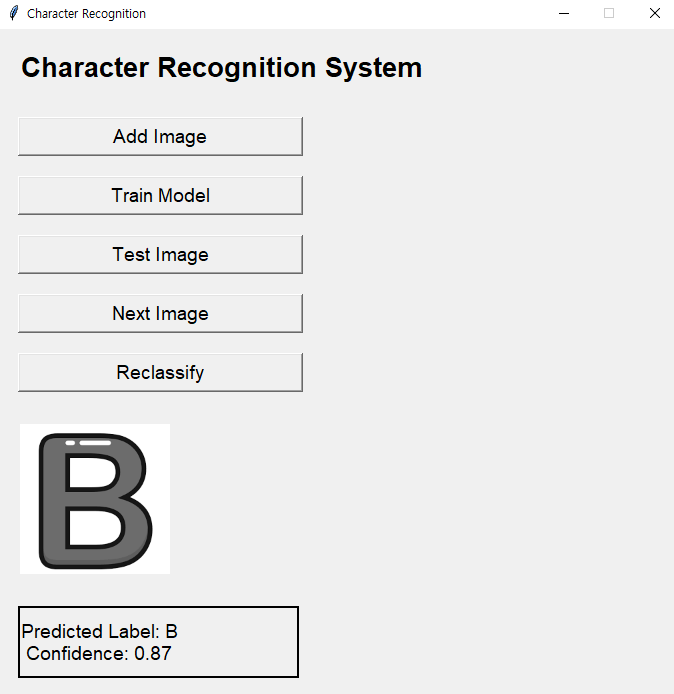
self.label = Label(master, text="Character Recognition System", font=("Helvetica", 20, "bold"))
self.label.grid(row=0, column=0, padx=20, pady=20, sticky="w")
button_width = 25 # 가로로 긴 버튼을 만들기 위해 버튼 폭 설정
self.add_image_button = Button(master, text="Add Image", command=self.add_image, font=("Helvetica", 14), width=button_width)
self.add_image_button.grid(row=1, column=0, pady=10, padx=20, sticky="w")
self.train_button = Button(master, text="Train Model", command=self.train_model, font=("Helvetica", 14), width=button_width)
self.train_button.grid(row=2, column=0, pady=10, padx=20, sticky="w")
self.test_image_button = Button(master, text="Test Image", command=self.test_image, font=("Helvetica", 14), width=button_width)
self.test_image_button.grid(row=3, column=0, pady=10, padx=20, sticky="w")
self.next_image_button = Button(master, text="Next Image", command=self.next_image, font=("Helvetica", 14), width=button_width)
self.next_image_button.grid(row=4, column=0, pady=10, padx=20, sticky="w")
self.reclassify_button = Button(master, text="Reclassify", command=self.reclassify_image, font=("Helvetica", 14), width=button_width)
self.reclassify_button.grid(row=5, column=0, pady=10, padx=20, sticky="w")
self.image_label = Label(master, width=img_width, height=img_height)
self.image_label.grid(row=6, column=0, pady=20, padx=20, sticky="w")
self.result_label = Label(master, text="", font=("Helvetica", 14), width=button_width, height=3, relief="solid", anchor="w")
self.result_label.grid(row=7, column=0, pady=10, padx=20, sticky="w")
self.current_image_index = 0
self.model = None
def add_image(self):
file_path = filedialog.askopenfilename()
if file_path:
self.process_image(file_path)
def process_image(self, image_path):
img = cv2.imread(image_path, cv2.IMREAD_GRAYSCALE)
img = cv2.resize(img, (img_width, img_height))
# 사용자에게 라벨 입력 받기
label = simpledialog.askstring("Input", f"Enter label for this image:", parent=self.master).upper()
if label and label in class_names:
target_dir = os.path.join(dataset_dir, label)
os.makedirs(target_dir, exist_ok=True)
new_path = os.path.join(target_dir, os.path.basename(image_path))
shutil.copy(image_path, new_path)
image_labels[new_path] = label
with open(label_file, 'wb') as f:
pickle.dump(image_labels, f)
self.show_message(f"Image added and labeled as {label}")
else:
self.show_message("Invalid label. Image not added.")
def train_model(self):
# 데이터 준비
images = []
labels = []
for img_path, label in image_labels.items():
img = cv2.imread(img_path, cv2.IMREAD_GRAYSCALE)
img = cv2.resize(img, (img_width, img_height))
images.append(img)
labels.append(class_names.index(label))
images = np.array(images) / 255.0
images = np.expand_dims(images, axis=-1)
labels = np.array(labels)
# 모델 구성
self.model = tf.keras.models.Sequential([
tf.keras.layers.Conv2D(32, (3, 3), activation='relu', input_shape=(img_height, img_width, 1)),
tf.keras.layers.MaxPooling2D((2, 2)),
tf.keras.layers.Conv2D(64, (3, 3), activation='relu'),
tf.keras.layers.MaxPooling2D((2, 2)),
tf.keras.layers.Conv2D(64, (3, 3), activation='relu'),
tf.keras.layers.Flatten(),
tf.keras.layers.Dense(64, activation='relu'),
tf.keras.layers.Dense(len(class_names), activation='softmax')
])
self.model.compile(optimizer='adam', loss='sparse_categorical_crossentropy', metrics=['accuracy'])
# 모델 학습
self.model.fit(images, labels, epochs=5, validation_split=0.2)
# 모델 저장
self.model.save(model_file)
self.show_message("Model trained and saved.")
def next_image(self):
if not self.model:
if os.path.exists(model_file):
self.model = tf.keras.models.load_model(model_file)
else:
self.show_message("Model not trained. Train the model first.")
return
if self.current_image_index >= len(image_labels):
self.current_image_index = 0
img_path = list(image_labels.keys())[self.current_image_index]
self.show_image_and_prediction(img_path)
self.current_image_index += 1
def test_image(self):
if not self.model:
if os.path.exists(model_file):
self.model = tf.keras.models.load_model(model_file)
else:
self.show_message("Model not trained. Train the model first.")
return
file_path = filedialog.askopenfilename()
if file_path:
self.show_image_and_prediction(file_path)
def show_image_and_prediction(self, img_path):
img = cv2.imread(img_path, cv2.IMREAD_GRAYSCALE)
img_resized = cv2.resize(img, (img_width, img_height))
img_normalized = img_resized / 255.0
img_input = np.expand_dims(np.expand_dims(img_normalized, axis=-1), axis=0)
predictions = self.model.predict(img_input)
predicted_class_index = np.argmax(predictions)
confidence = np.max(predictions)
predicted_label = class_names[predicted_class_index]
img_display = ImageTk.PhotoImage(Image.fromarray(img_resized))
self.image_label.config(image=img_display)
self.image_label.image = img_display
self.result_label.config(text=f"Predicted Label: {predicted_label}\nConfidence: {confidence:.2f}")
def reclassify_image(self):
img_path = list(image_labels.keys())[self.current_image_index - 1]
new_label = simpledialog.askstring("Input", f"Enter new label for this image:", parent=self.master)
if new_label and new_label.upper() in class_names:
image_labels[img_path] = new_label.upper()
with open(label_file, 'wb') as f:
pickle.dump(image_labels, f)
self.show_message(f"Image reclassified as {new_label.upper()}")
self.next_image()
else:
self.show_message("Invalid label. Reclassification not done.")
def show_message(self, message):
self.result_label.config(text=message)
if __name__ == "__main__":
root = Tk()
root.geometry("400x700")
app = CharacterRecognitionApp(root)
root.mainloop()

728x90
'AI(Artificial Intelligence)' 카테고리의 다른 글
| python embedding + vector store for LLM (0) | 2024.09.01 |
|---|---|
| classification - adagrad + dropout ( 분류 - 아다그라드 + 드랍아웃 ) (0) | 2024.08.21 |
| classification - GSD + dropout ( 분류 - 확률적 경사하강법 + 드랍아웃 ) (0) | 2024.08.21 |
| classification - adagrad ( 분류 - 아다그라드 ) (0) | 2024.08.21 |
| classification - Stochastic Gradient Descent (분류 - 확률적경사하강법) (0) | 2024.08.21 |


