728x90
mfcbuttontest.zip
0.07MB
MfcButtonTest_Auto.zip
0.01MB
vcpkg 설치 이후, PowerShell에서 gtest를 설치하고 연동하는 과정을 요약해드립니다.
✅ GoogleTest 설치
cd D:\tools\vcpkg
.\vcpkg install gtest:x64-windows
※ gtest:x64-windows → 64비트용 gtest 설치
✅ Visual Studio 연동
.\vcpkg integrate install
- Visual Studio 프로젝트에서 #include <gtest/gtest.h> 바로 사용 가능
- 자동으로 gtest.lib, gtest_main.lib 링크됨
- 경로 추가나 링커 설정 필요 없음
✅ 환경 구성 흐름
1. vcpkg 설치 및 환경변수 설정
2. PowerShell에서 `vcpkg install gtest:x64-windows`
3. `vcpkg integrate install`로 VS 자동 연동
4. VS 프로젝트에서 바로 gtest 사용 가능
아래는 이번 작업을 통해 구성된 MFC UI 앱 + GoogleTest 실행기 + WinAppDriver 자동화 테스트의
📂 간단한 디렉토리 구조와 각 파일의 역할 설명입니다.
✅ 디렉토리 구조
MyTestSolution/
├── mfcbuttontest/                    # 🎨 MFC UI 앱 (버튼 제공)
│   ├── mfcbuttontest.sln            # 전체 솔루션 파일
│   ├── mfcbuttontest.vcxproj        # MFC 앱 프로젝트 파일
│   ├── mfcbuttontest.cpp            # MFC 앱 진입점
│   ├── mfcbuttontestDlg.cpp         # 다이얼로그 로직
│   ├── mfcbuttontestDlg.h
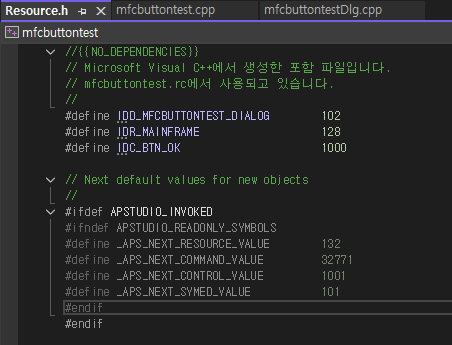
│   ├── resource.h / .rc             # 버튼 리소스 (IDC_BTN_OK = 1000)
│   └── ... (기타 stdafx, pch 등)
│
├── MfcButtonTest_Auto/              # 🧪 테스트 실행기 (콘솔 앱)
│   ├── MfcButtonTest_Auto.vcxproj   # 콘솔 테스트 실행기 프로젝트
│   ├── main.cpp                     # GoogleTest 진입점
│   ├── MfcAppTest.cpp               # 테스트 본문 (WinHTTP 사용)
│   ├── MfcAppTest.h                 # 세션/클릭 함수 선언
│   └── (gtest/lib 포함되거나 vcpkg로 연결)
│
└── WinAppDriver/                    # ▶️ 외부 실행 프로그램
    └── WinAppDriver.exe             # 반드시 수동 실행 필요
✅ 각 역할
폴더/파일 설명
| mfcbuttontest/ | MFC UI 앱. 버튼(ID 1000)을 화면에 표시 |
| mfcbuttontestDlg.cpp | 다이얼로그 동작 정의. OnInitDialog()에서 버튼 생성 |
| resource.h / .rc | IDC_BTN_OK = 1000 정의 |
| MfcButtonTest_Auto/ | GoogleTest 기반 콘솔 테스트 실행기 |
| main.cpp | InitGoogleTest() + RUN_ALL_TESTS() |
| MfcAppTest.cpp | WinHTTP로 WinAppDriver와 통신, 앱 실행 및 버튼 클릭 |
| WinAppDriver.exe | Microsoft 공식 UI 자동화 서버. 수동 실행 필요 (/session 기반 REST API) |
✅ 실행 흐름
(1) WinAppDriver.exe 실행
       ↓
(2) MfcButtonTest_Auto.exe 실행
       ↓
    [main.cpp] RUN_ALL_TESTS()
       ↓
    [MfcAppTest.cpp]
        - POST /session → mfcbuttontest.exe 실행
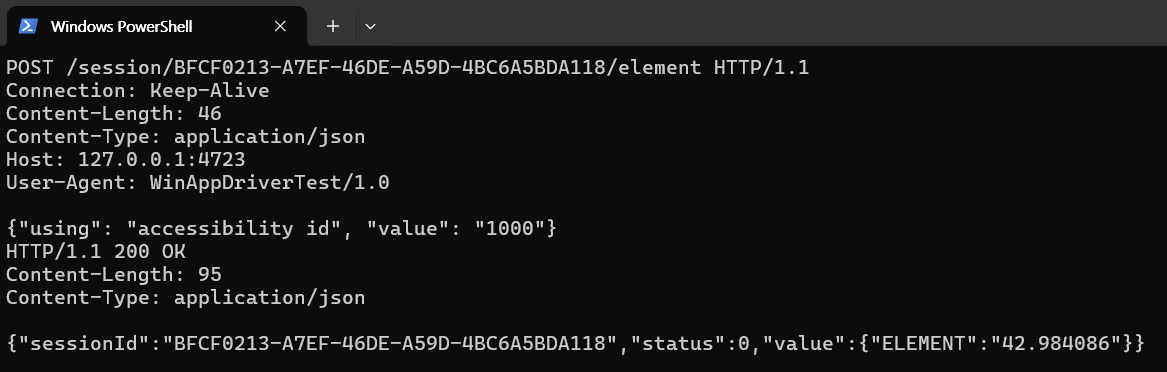
        - POST /element → 버튼(ID=1000) 찾기
        - POST /click → 클릭
       ↓
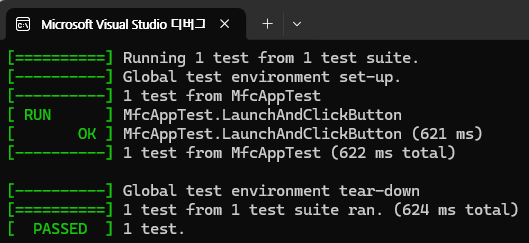
    테스트 통과 → 종료
✅ 필요 구성
항목 필요 여부 설치 방식
| Visual Studio 2022 | ✅ | MFC + Desktop C++ 워크로드 |
| GoogleTest | ✅ | vcpkg install gtest or 직접 빌드 |
| WinAppDriver | ✅ | https://github.com/microsoft/WinAppDriver/releases |
| CPR / nlohmann/json | ❌ | 사용 안 함 (WinHTTP + string 파싱만 사용) |
//main.cpp
#include <gtest/gtest.h>
int main(int argc, char** argv)
{
::testing::InitGoogleTest(&argc, argv);
return RUN_ALL_TESTS();
}
//MfcAppTest.h
#pragma once
#include <string>
bool LaunchMfcAppViaWinAppDriver(std::string& sessionId);
bool ClickButtonByAccessibilityId(const std::string& sessionId, const std::string& elementId);
//MfcAppTest.cpp
#include "MfcAppTest.h"
#include <gtest/gtest.h>
#include <windows.h>
#include <winhttp.h>
#include <iostream>
#include <sstream>
#pragma comment(lib, "winhttp.lib")
std::string ToUtf8(const std::wstring& wstr)
{
if (wstr.empty()) return {};
int size = WideCharToMultiByte(CP_UTF8, 0, wstr.c_str(), -1, nullptr, 0, nullptr, nullptr);
if (size <= 0) return {};
std::string result(size - 1, 0); // null 포함한 크기 -1 (std::string에는 null 불필요)
WideCharToMultiByte(CP_UTF8, 0, wstr.c_str(), -1, &result[0], size, nullptr, nullptr);
return result;
}
bool HttpPost(const std::wstring& path, const std::string& body, std::string& response)
{
HINTERNET hSession = WinHttpOpen(L"WinAppDriverTest/1.0", WINHTTP_ACCESS_TYPE_NO_PROXY, nullptr, nullptr, 0);
if (!hSession) return false;
HINTERNET hConnect = WinHttpConnect(hSession, L"127.0.0.1", 4723, 0);
if (!hConnect) return false;
HINTERNET hRequest = WinHttpOpenRequest(hConnect, L"POST", path.c_str(), nullptr, WINHTTP_NO_REFERER,
WINHTTP_DEFAULT_ACCEPT_TYPES, 0);
std::wstring headers = L"Content-Type: application/json\r\n";
const char* bodyData = body.c_str();
BOOL bResult = WinHttpSendRequest(
hRequest,
headers.c_str(), (DWORD)-1,
const_cast<LPVOID>(static_cast<const void*>(bodyData)), // ✅ 핵심 수정
(DWORD)body.size(),
(DWORD)body.size(),
0
);
if (!bResult || !WinHttpReceiveResponse(hRequest, nullptr)) return false;
std::stringstream ss;
DWORD dwDownloaded = 0;
do {
char buffer[4096];
if (!WinHttpReadData(hRequest, buffer, sizeof(buffer), &dwDownloaded)) break;
ss.write(buffer, dwDownloaded);
} while (dwDownloaded > 0);
response = ss.str();
WinHttpCloseHandle(hRequest);
WinHttpCloseHandle(hConnect);
WinHttpCloseHandle(hSession);
return true;
}
bool LaunchMfcAppViaWinAppDriver(std::string& sessionId)
{
std::string response;
std::string body = R"({
"desiredCapabilities": {
"platformName": "Windows",
"deviceName": "WindowsPC",
"app": "D:\\Users\\ahrns\\source\\repos\\mfcbuttontest\\x64\\Debug\\mfcbuttontest.exe"
}
})";
if (!HttpPost(L"/session", body, response)) return false;
std::string key = "\"sessionId\":\"";
auto pos = response.find(key);
if (pos == std::string::npos) return false;
pos += key.length();
auto end = response.find('"', pos);
if (end == std::string::npos) return false;
sessionId = response.substr(pos, end - pos);
return !sessionId.empty();
}
bool ClickButtonByAccessibilityId(const std::string& sessionId, const std::string& elementId)
{
std::string response;
std::ostringstream ss;
ss << R"({"using": "accessibility id", "value": ")" << elementId << R"("})";
std::wstring elementPath = L"/session/" + std::wstring(sessionId.begin(), sessionId.end()) + L"/element";
if (!HttpPost(elementPath, ss.str(), response)) return false;
std::string key = "\"ELEMENT\":\"";
auto pos = response.find(key);
if (pos == std::string::npos) return false;
pos += key.length();
auto end = response.find('"', pos);
if (end == std::string::npos) return false;
std::string eid = response.substr(pos, end - pos);
std::wstring clickPath = L"/session/" + std::wstring(sessionId.begin(), sessionId.end()) + L"/element/"
+ std::wstring(eid.begin(), eid.end()) + L"/click";
return HttpPost(clickPath, "{}", response);
}
TEST(MfcAppTest, LaunchAndClickButton)
{
std::string sessionId;
ASSERT_TRUE(LaunchMfcAppViaWinAppDriver(sessionId)) << "앱 실행 실패";
ASSERT_TRUE(ClickButtonByAccessibilityId(sessionId, "1000")) << "버튼 클릭 실패";
}
728x90
'TA(Test Automation)' 카테고리의 다른 글
| GoogleTest + GoogleMock Manual Build Guide (MinGW) (0) | 2025.04.07 |
|---|---|
| appium, python, android, 테스트 자동화 (0) | 2025.01.14 |
| googletest VSCODE C/C++ (0) | 2025.01.10 |
| python unittest - assertEqual (0) | 2024.08.26 |

